Operations ERP
An ERP for a timber exporter's back office: purchase orders, the SII's records, bank statements, payments and export paperwork, in one place.
- Role
- Sole engineer
- Client
- A timber exporter in Chile
- Year
- 2023
- Status
- Built and tested; pilot next
- Stack
- Frappe Framework 15, Python, Vue 3, MariaDB, Redis, Docker Compose, Nginx, wkhtmltopdf, Mailpit
The brief
An ERP for a timber exporter in Chile, built in 2023. It covers purchasing, accounts payable, the bank, the SII's books, export case files and supplier emails. Accounting, invoicing, payroll and inventory stay outside it, and the bank and the SII are imported from files, not connected.
What a person decides
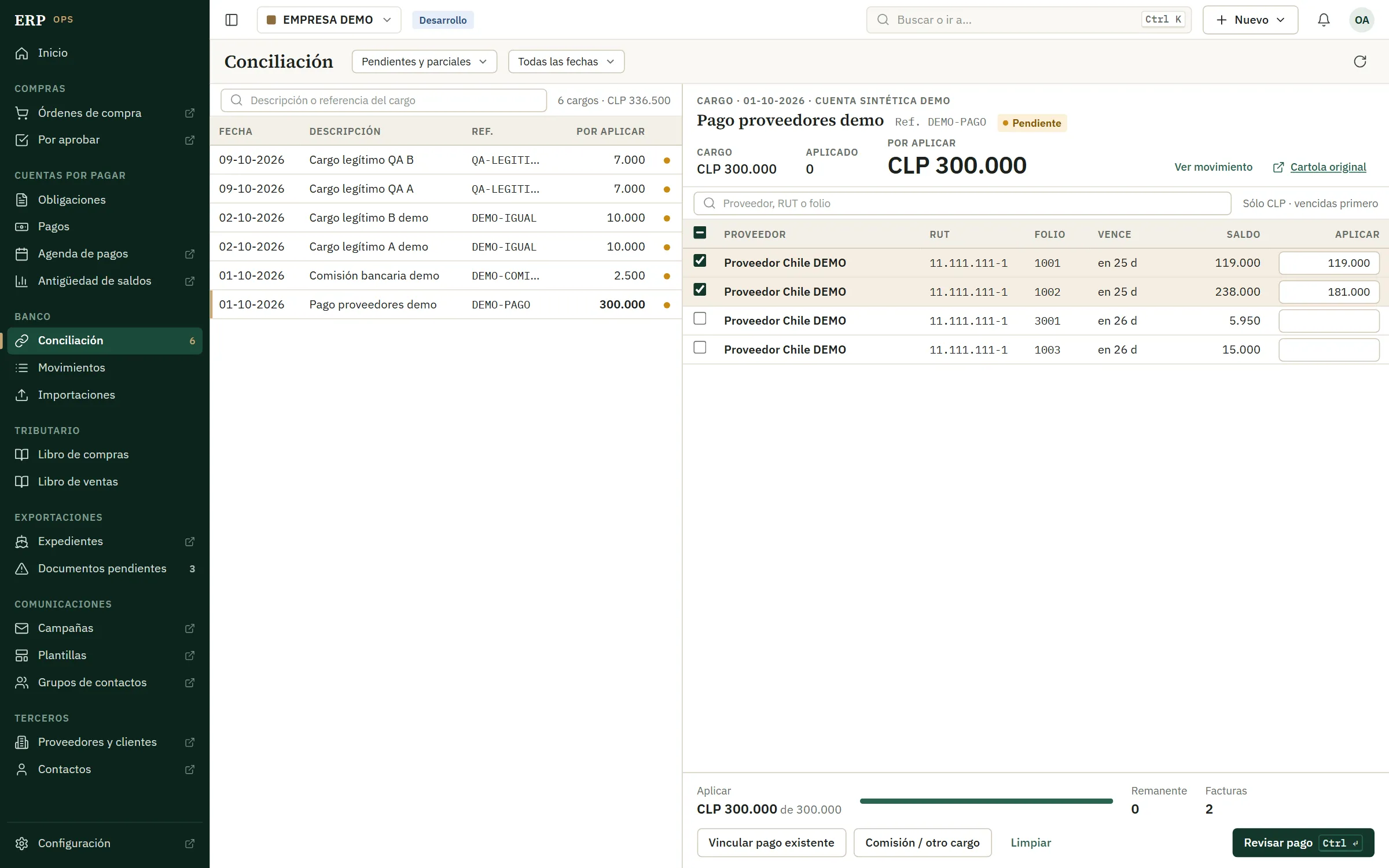
Whether an imported row is new, a duplicate or left out, and why. Which invoices a bank charge pays, and how much of each. Who approves a purchase order. Whether an export case closes with a document missing, which only an administrator can do, with a reason.
What the system enforces
Nobody approves their own purchase order. A payment never exceeds what is owed or what the bank charge has left, even when two people apply it at the same time. Importing the SII's records again keeps the payments already made. A confirmed payment is undone only by a reversal with a reason, and both stay in the history.
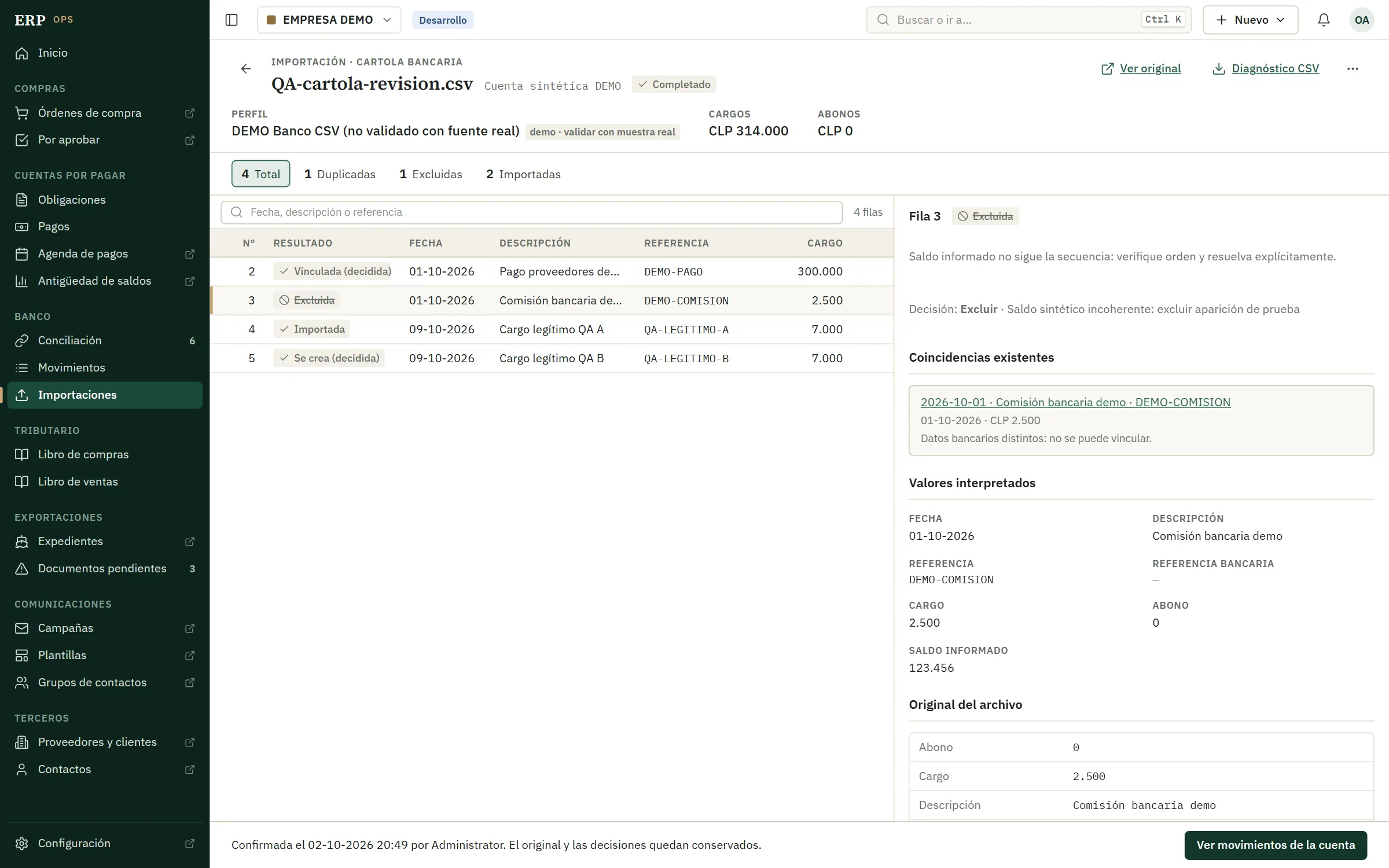
An imported bank statement after review, with sample data (the interface is in Spanish).
- Before anything is saved, every row is counted as new, a duplicate or left out.
- A row left out keeps the reason someone gave for it.
- A row that matches a movement already in the books is shown beside it. The same date and amount are not enough to call it a duplicate.
- Confirmed in one step. The original file and every decision are kept.
What it covers
-
Buy.
A purchase order goes to a second person for approval, then to the supplier as a PDF. A change after approval is a new, linked order that needs approval again.
-
Import.
Bank statements and the SII's purchase and sales books come in as CSV or Excel files. Every row is reviewed before it is saved, and the original file stays attached.
-
Pay and reconcile.
One bank charge can pay several invoices, in part or in full. The system suggests invoices whose balance or supplier matches the charge, and shows every balance before and after the payment is confirmed.
-
Export.
Each shipment has a case file listing the documents it needs, with due dates and alerts. It closes once the required ones are in.
-
Write to suppliers.
A campaign writes one email per contact, fixed and reviewed before sending, with one attempt each. A doubtful result goes to a person and is never resent automatically.
In numbers
- 1,356 rows from 23 files of the company's SII records, in copies with names and IDs replaced, run through the importer in a test that left nothing behind
- 76 automated tests: approvals, imports, payments, reversals and what each role can see
- 4 roles: administrator, user, approver and read-only. Approving purchase orders gives no access to finance.
AI in this project
Not in the product: no model runs in it, and reconciliation suggestions come from rules. AI coding agents wrote much of the code, under rules I set: every business rule checked on the server, nothing saved before a person reviews it, and no real emails sent while testing.